Running multi-modal LLMs via vLLM on Windows and docker
Published:
Introduction
We have already explored Ollama; now we will look at vLLM, another strong framework for running local models. vLLM can be a better choice when you need high-throughput serving, OpenAI-compatible APIs, and efficient GPU memory usage through optimizations such as PagedAttention. It also supports modern multimodal models and makes it easier to scale from local testing to production-style API serving. If your workflow involves batch requests, multiple clients, or longer-context inference, vLLM is often a practical step up.
Setting up vLLM with docker on Windows
We will deploy vLLM with Docker on Windows using PowerShell, and then access it from WSL or any other device on the same network.
docker run --rm -it --gpus all `
  -e HF_TOKEN=Option_HF_Token `
  -e HF_HOME=/workspace/hf_cache `
  -e XDG_CACHE_HOME=/workspace/cache `
  -p 8000:8000 `
  -v C:\Users\sande\window-sande\Projects\vllm:/workspace `
  --ipc=host `
  vllm/vllm-openai:latest `
  --model Qwen/Qwen3-VL-2B-Instruct-FP8 `
  --host 0.0.0.0 `
  --port 8000 `
  --download-dir /workspace/hf_cache `
  --allowed-local-media-path /workspace `
  --max-model-len 4096 `
  --gpu-memory-utilization 0.90
Once deployed, check the logs and wait until you see the model loaded and the server listening on port 8000. You can then test the endpoint locally with http://localhost:8000/v1/models or from WSL with http://<windows-host-ip>:8000/v1/models. If the call returns model metadata, your deployment is ready for OpenAI-compatible client requests.
Using on WSL or any other client with sample video
For quick trials, you can use the official example with one modification: replace the model with the one deployed above, i.e., Qwen/Qwen3-VL-2B-Instruct-FP8. For video analysis, replace messages with the following:
messages = [
    {
        "role": "user",
        "content": [
            {
                "type": "video_url",
                "video_url": {
                    "url": "https://filesamples.com/samples/video/mp4/sample_640x360.mp4"
                }
            },
            {
                "type": "text",
                "text": "Please caption the notable attributes in the provided video. ",
            }
        ]
    }
]
Output will be:
Response costs: 5.29s
Generated text: A woman sits on a sandy beach, facing the ocean. She is wearing a pink dress and has long dark hair. The sky is blue with white clouds, and the sea is calm with small waves. The woman remains still, watching the water.
We will go one step further by analyzing traffic data. Here we use the A2D2 dataset for front-camera images; you can download it for free from the official website. For this experiment, we use the preview path a2d2-preview\camera_lidar\20190401_145936\camera\cam_front_center.
import base64
import io
import glob
from PIL import Image
from openai import OpenAI

client = OpenAI(
    api_key="EMPTY",
    base_url="http://localhost:8000/v1",
    timeout=3600
)

MODEL = "Qwen/Qwen3-VL-2B-Instruct-FP8"

# ---------- image compression for model ----------
def image_to_data_url(path: str, max_width: int = 384, jpeg_quality: int = 70) -> str:
    img = Image.open(path).convert("RGB")
    w, h = img.size
    if w > max_width:
        new_h = int(h * (max_width / w))
        img = img.resize((max_width, new_h), Image.BICUBIC)

    buf = io.BytesIO()
    img.save(buf, format="JPEG", quality=jpeg_quality, optimize=True)
    return "data:image/jpeg;base64," + base64.b64encode(buf.getvalue()).decode()

# ---------- GIF creation ----------
from PIL import Image

def make_gif(frame_paths, out="used_frames.gif", fps=4, max_width=200):
    frames = []
    for p in frame_paths:
        im = Image.open(p).convert("RGB")

        # 🔥 downscale
        w, h = im.size
        if w > max_width:
            new_h = int(h * (max_width / w))
            im = im.resize((max_width, new_h), Image.BICUBIC)

        frames.append(im)

    # convert to GIF palette (reduces size a lot)
    frames = [im.convert("P", palette=Image.Palette.ADAPTIVE, colors=64) for im in frames]

    frames[0].save(
        out,
        save_all=True,
        append_images=frames[1:],
        duration=int(1000/fps),
        loop=0,
        optimize=True,
        disposal=2
    )


# ---------- Load frames ----------
paths = sorted(glob.glob("./images/*.png"))
if len(paths) < 1:
    raise RuntimeError("No images found")

chosen = paths[:10]  # ✅ first 10 only

# ---------- Create GIF ----------
gif_path = make_gif(chosen, fps=4)
print("GIF written:", gif_path)

# ---------- Single model call ----------
content = [{
    "type": "text",
    "text": (
        "These are time-ordered driving frames.\n"
        "Describe temporal events, hazards, agents and ego intent concisely."
    )
}]

for p in chosen:
    content.append({
        "type": "image_url",
        "image_url": {"url": image_to_data_url(p)}
    })

resp = client.chat.completions.create(
    model=MODEL,
    messages=[{"role": "user", "content": content}],
    max_tokens=350
)

print(resp.choices[0].message.content)
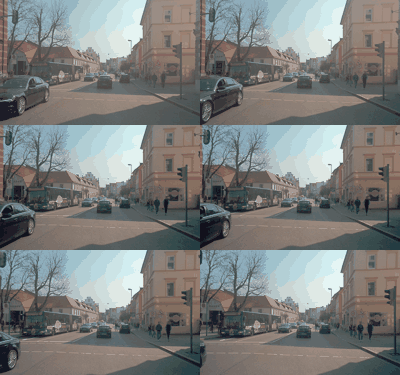 | |
As we used a relatively small 2B model, below-average reasoning quality is expected. Additionally, we compressed the images to fit context constraints, which further degraded output quality.
Use Cases
With this kind of video analytics, several tasks can be automated that were traditionally handled by separate object detection and activity detection pipelines, such as surveillance and monitoring. Additionally, such models can be fine-tuned for advanced reasoning tasks, e.g., Cosmos-r2.
Connect with me on LinkedIn for any questions!
